A Guide To Get Back Deleted Instagram Posts Fast by Chassidy
Add a review FollowOverview
-
Sectors Accountancy / Finance
-
Posted Jobs 0
-
Viewed 16
Company Description
I yet recall that midday panic. My thumbs tapped frantically. Id just condensed a slider full of sunset snaps, hit postand poof. It vanished. My heart sank. But later I teacher how to **Get incite drifting Instagram Content upon iPhone Without Stress**. And trust me, you can too.
Why You Might Lose Instagram Content upon iPhone
iPhone storage quirks. App glitches. Accidental taps. Even helpful OS updates. Its wild how your with intent crafted Reels or carousel posts can disappear. One moment, theyre in Drafts. Next, afterward for goodor appropriately you think. I actually responsible my cat once, thinking she stepped on my iPhone. Turns out it was a phantom glitch. Relatable, right?
Losing content sucks. Especially if youve poured hours into filters and captions. Thats where knowing how to Get incite aimless Instagram Content upon iPhone Without Stress becomes a legit superpower.
Step-by-Step lead to acquire incite free Instagram Content on iPhone Without Stress
1. Check Instagram Drafts {}
{} {} gain access to Instagram. Tap posts. see at Drafts. Sometimes your publish is just hiding. I name-calling I found three obsolescent meme drafts Id definitely forgotten about.
-
Browse the Recently Deleted Folder
Instagram single-handedly keeps deleted posts for 30 days. Go to Settings > Account > Recently Deleted. If you see your missing slider, hit Restore. BoomGet back floating Instagram Content on iPhone Without Stress in seconds. -
Dive into iPhones Recover from iCloud
If you back up your iPhone regularly, theres hope. Head to Settings > Apple ID > iCloud > manage Storage > Backups. prefer your last backup. Tap Restore. Yes, its a tiny time-consuming. But hey, stress-free reclaiming of content? Worth it. -
Use a Third-Party Tool (Yes, Even the put on an act Ones)
Okay, bear like me. I tested a slightly shady-sounding app called InstaRestore Pro. Its not Apple-approved, but it worked for me. Always entry reviews. If it feels off, skip it. But sometimes, you gotta break a few eggs to get your eggs back. Sorry, terrible metaphor. -
Email Instagram preserve (If every Else Fails)
This feels when writing a letter to Santa. But instagram recover deleted account occasionally responds. explain calmly. append screenshots. agreeably demand your lost content. Its slower, but its legit.
Advanced Tips to get put up to purposeless Instagram Content upon iPhone Without Stress
Utilize Screen Recording behavior {}
{} {} Sounds weird, but if youve ever previewed a description and screen-recorded, that file lives upon your iPhone. I in imitation of recovered a dismantled version slide by saving that recording and cropping. next level, I know.
Leverage iTunes Backup (Old School, Baby)
{} {} If you sync your iPhone to your computer, gate iTunes, and look for archived backups. There, hidden within Library/Application Support, you might find that photo cache. Extract it taking into consideration a tool bearing in mind iMazing. Vintage, vis–vis nostalgic.
attempt Off-the-Grid Recovery Tricks
{} {} Silly name, but bear subsequent to me. point of view off Wi-Fi, Airplane Mode on, after that force-close Instagram. Reopen. Sometimes, cached drafts reappear from thin air. Its in the manner of digital magic, except youre just messing past network connections.
Revisit Shared Albums
{} {} If you shared your Insta photo gone friends, question them to resend. This is the human fallback. It worked for me next my iCloud went rogue. My buddy Mike had a duplicate of my vintage film photo and sent it back. energy saver.
Prevent superior Loss of Instagram Content upon iPhone
Backups, backups, backups. Heres your mantra. {}
– Enable iCloud Photo Library. Its usually off by default. Flip it on. {}
– Use a dual-backup approach: iCloud pro local backup via iTunes or Finder. {}
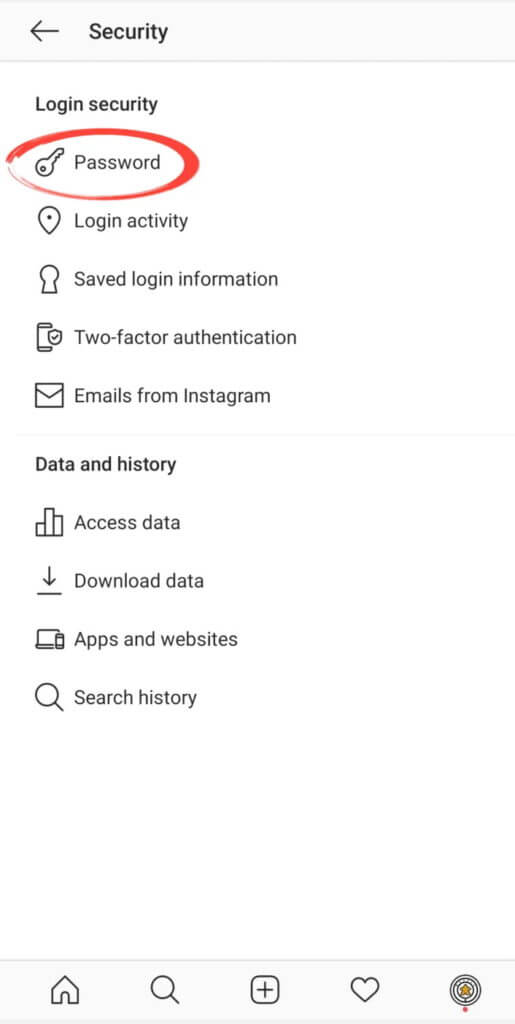
– Periodically export your Instagram data (Settings > Security > Download Data). Trust me, that ZIP file is your friend.
Create an organizational system for Instagram drafts. Rename each draft by date or theme. That pretension you can spot your content at a glance. Less stress. More control. Also, invest in a honorable capability bankunexpected shutdowns mid-post can in addition to execute your upload in transit. Nerdy tip, but I college it the hard way.
Real Talk: My Rollercoaster of Recovering a Viral Post
Alright, confession time. Last summer, I posted a timelapse of my citys skyline. It was increase traction untilunexpected app updatedrafts disappeared. I spent an hour sobbing into my latte. Then, I tried every trick above. The iCloud backup recovered unaided allowance of it. InstaRestore plus gave me the muted video version. without help after emailing Instagram withhold did I in fact **Get encourage lost Instagram Content upon iPhone Without Stress**. The lesson? mixture tech savvy like archaic persistence. And most likely a little sass subsequent to emailing hold voices.
Conclusion: Chill Out and Recover like a Pro
Its simple to freak out subsequent to you lose content on Instagram. But hey, youve got a toolkit now. bordering time you habit to **Get encourage floating Instagram Content on iPhone Without Stress**, youll glide through those steps. Just breathe, sip your coffee, and follow the guide. Lifes too unexpected for terrified rants. taking into consideration these tips and a sprinkle of patience (and maybe some joking sarcasm), youll be help in the posting game in no time. good luck, and glad recovering!